The desire to improve mobile photography skills is shared by many iPhone users. With the arrival of various photo applications, it is now possible to experiment with creative edits in a more accessible and intuitive way. Among the standout tools, the photo mask stands out for its ability to transform an ordinary image into a visual work of art. This feature allows users to play with visual effects, apply sophisticated filters, and add custom layers in no time. By mastering this technique, mobile photography enthusiasts can refine their aesthetics while offering their audience unique and evocative images.
Understanding the photo mask: definition and functioning
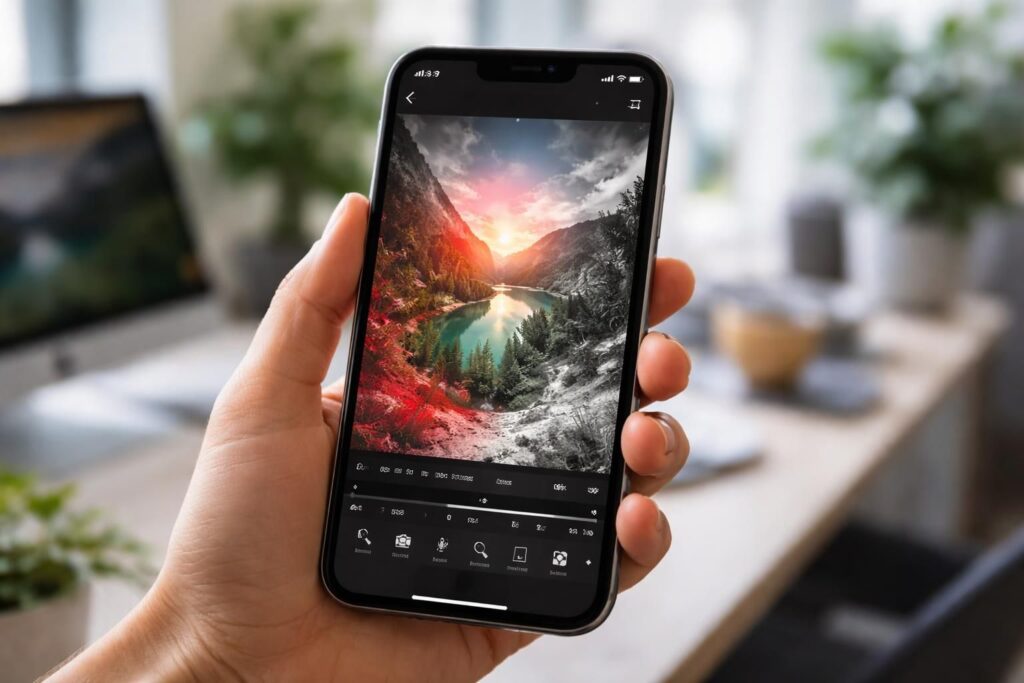
The term photo mask refers to a selection method used in photo editing to isolate or modify a specific part of an image. Unlike traditional retouching tools, a mask allows for the preservation of the integrity of the original image while making targeted adjustments. Masks can be applied to various aspects, such as exposure, colors, or saturation. On iPhone, several applications incorporate this feature, making it easier to use even for photography novices.
Types of masks available
There are several types of masks that can be used during photo editing on iPhone:
- Brightness mask: This allows for adjusting light values in certain areas of the image.
- Color mask: This offers the possibility to modify specific color ranges without altering the rest of the image.
- Blur mask: This technique allows an element to stand out by blurring, while keeping other parts sharp.
Each type of mask exerts fine control over the image, allowing the user to achieve creative edits. For example, a color mask can be used to enhance the hue of a sunset, while a brightness mask could accentuate the details of a landscape.
The best photo applications for applying masks
The choice of application plays a crucial role in the effectiveness of using masks. The App Store offers a myriad of options, but some stand out for their advanced features. Among these, we can mention:
| Application | Features |
|---|---|
| Adobe Photoshop Express | Offers a wide range of filters and advanced masking tools. |
| Snapseed | Includes color and brightness masks with an intuitive interface. |
| VSCO | Known for its professional-quality filters and masking options. |
| PicsArt | Allows for various creative edits and custom layers. |
These applications integrate photo editing options through masks, making images more attractive and personalized. Using these tools can make the difference between an ordinary photo and a striking image.
Techniques for effective use of photo masks
Using a photo mask is not improvised and requires some techniques to maximize results. Initially, it is wise to familiarize oneself with the interface of the chosen application. Each option reveals itself as the user explores the features. It is advisable to start with less complex images before moving on to more elaborate compositions.
Basic steps to apply a mask
To effectively use a mask, follow the steps below:
- Choose the image: Select the image that will require a creative adjustment.
- Access the mask tool: Look for the mask tool in the application options.
- Define the area to work on: Use a brush to select the part you wish to modify.
- Apply adjustments: Modify settings such as brightness, contrast, or saturation.
- Finalize and save: When you are satisfied with the result, save the image.
This method ensures a systematic approach, thus avoiding any errors when using masks. The more the steps are followed, the better the results will be.
Inspiring examples of creative edits with photo masks
In the world of mobile photography, inspiration is a driver of creativity. Observing examples of successful edits with photo masks can provide new ideas to users. For instance, several artists have used masks to create striking works, showcasing urban landscapes with neon lights or portraits enhanced by soft blurs.
Study case: use of masks in landscape photography
In a particular case, some photographers have managed to capture natural scenes by playing with color and brightness masks. By highlighting certain shades of green in a park while softening the skies using a blur mask, the images come alive and emerge vibrantly.
Portrait photography: the art of detail
In the realm of portraits, masks allow for highlighting the eyes or the texture of the skin. For example, one can use a mask to increase the brightness of the eyes while keeping the rest of the face in soft light. This technique enhances the subject being photographed while maintaining a natural atmosphere.
Precautions to take when using masks
Although the use of masks can yield aesthetically pleasing results, there are certain precautions to take. The first is to avoid excessive modifications that can make the image unrealistic. Another essential point is to back up the original files, as it often happens that certain edits seem less effective over time.
Common mistakes to avoid
- Excessive use of filters: Colors can become unrealistic.
- Too aggressive modification: This can sometimes create a halo effect.
- Not testing edits on source images: Before finalizing an image, it is better to try different options.
Exploring new dimensions with layers and visual effects
To further enrich creative edits, the use of layers and visual effects proves constructive. Layers allow for stacking different modifications on an image without altering the original. This method promotes more flexibility for experimentation. By combining masks with layers, users can create artistic compositions by playing with transparency and opacity levels.
Advanced techniques with layers
For users eager to dive deeper into this technique, some tips can be followed:
- Duplicate the original layer: This allows you to always return to the base version.
- Test different masks on separate layers: This way, various combinations can be evaluated before making a decision.
- Save your work regularly: This prevents losing important edits.
By integrating these concepts, iPhone users can maximize their creative potential, transforming simple photos into complex and carefully crafted works of art.
Resources available to learn more
To become more familiar with photo masks and other photo editing tools, many online resources are available. Platforms like YouTube offer detailed tutorials, while specialized blogs regularly publish articles on new trends in mobile retouching. Additionally, online communities such as Reddit or photography forums can provide practical advice and feedback.
Interesting resources
- Tips on photo transfer errors on iPhone
- Video tutorials on using photo masks
- Advanced photo editing techniques